AI, in perspective
Ready for AI, but only if you want it
The apps work on their own. But because they all run on one WordPress, and each one describes what it can do, an AI can work across all of them: an assistant can live on your site, or the agents you already use (ChatGPT, Claude, Gemini CLI and others) can reach in. And if you build apps, a coding agent can do that with you — it works on the files, not the site.
None of this is required, and nothing leaves your site unless you connect something to it.
Your data in your apps. AI helps organize it.
A home for your personal knowledge
Each app is a specialist for its field: recipes with ingredients and steps, trips with places and plans, contacts with the details that matter.
AI works well with them, and importantly, the truth of your data remains in the apps.
Your WordPress is your personal knowledge base.
The app stands by itself
Each app stores its data in the WordPress database, and runs without AI.
You can use different AIs (e.g. through MCP) to interact with your data:
Query it, analyze it, augment it.
But in the end, the data stays under your control.
Let AI do the busywork
When you want help, an AI can use those abilities to add, modify, organize, or enrich.
It is quite incredible to have AI help you clean up the mess that accumulated over time.
And maybe ChatGPT is better at cooking than Claude, which is better at travel planning. You can choose what works best.
Personalize the apps, too
A personal knowledge base should fit the way you think and work.
You could vibe code an app on another platform, but you would need to start from scratch. Or you can use a WP App as your starting point.
Since it’s open source, you can make it truly yours. AI can be a great help to achieve that.
AI is an optional interface, not the system of record. Every connected assistant works through the abilities you expose and the permissions of your WordPress account.
Apps that describe what they can do
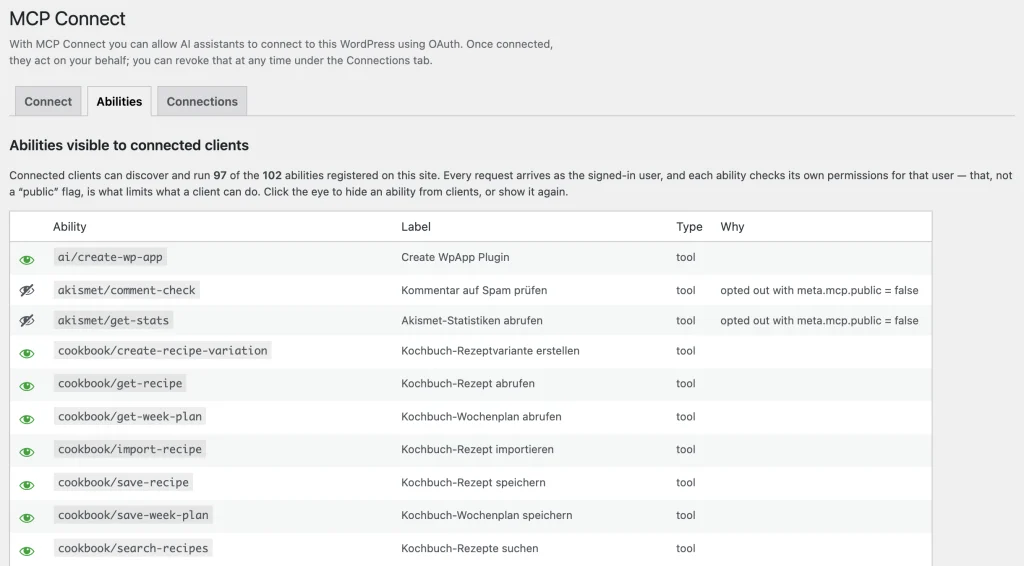
What makes any of this possible is that the apps register abilities: named, described, schema-typed operations built on the WordPress Abilities API. “List this week’s recipes.” “Add an entry to the journal.” “Find the feeds that mention a topic.” Routes are how people use an app; abilities are how everything else does.
Every ability runs the app’s own permission check for the signed-in user. An AI gets exactly what you could do yourself, and nothing more. Nothing needs to be wired up between apps in advance: they are simply there, in the same place, saying what they can do.
For app builders: Abilities in the wp-app docs covers how to register them and how to write descriptions worth calling.
An assistant on your site
The AI Assistant is an app like the others. It runs inside your WordPress, works with your own OpenAI or Anthropic API key or with a local model through Ollama or LM Studio, and can call the abilities of every app installed alongside it: ask it a question that spans your recipes and your calendar, have it file something into the right app, or let it build and modify apps for you. WordPress plugins are a structure every coding agent knows, and since all apps share one WordPress, it can work across them.
And when an AI builds an app for you, you already have the place to run it. No new server, no new service, just your WordPress.
Use your apps from ChatGPT, Claude and other agents
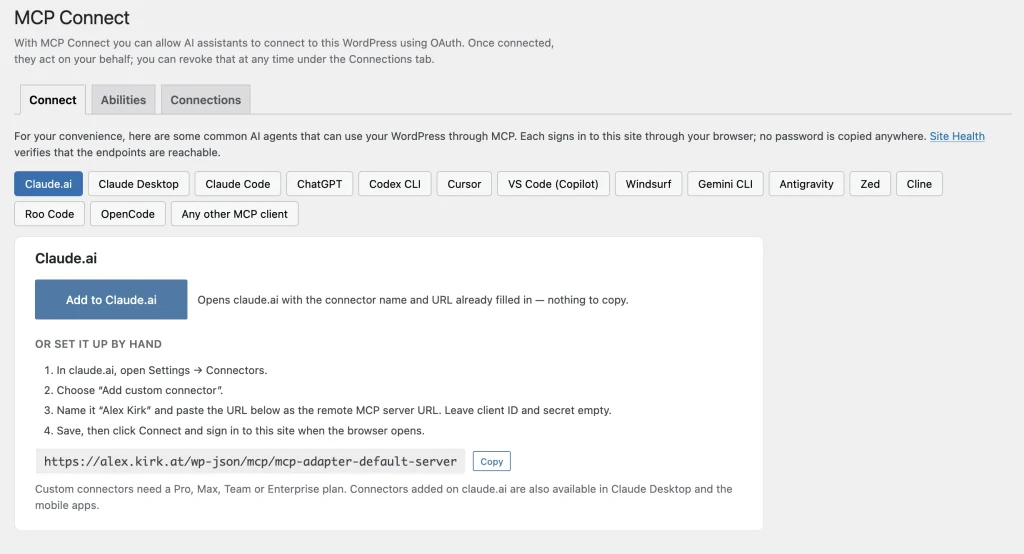
You may already have an assistant you talk to all day. Instead of bringing an AI to your site, MCP Connect brings your site to the AI: it turns your WordPress into an MCP server that ChatGPT, Claude.ai, Claude Desktop, Codex, Claude Code, Gemini CLI, Cursor, VS Code and other clients can sign in to. Once connected, your apps’ abilities show up as tools there, and “what did I cook last time we had guests?” is answered from your own recipes app.
Connecting is a normal sign-in. The client discovers your site, sends you to your own login page, you approve it on a consent screen, and it gets a token that only works for the MCP endpoint and only as you. There is no API key to paste and no external service in between. You can see every connected client under Tools → MCP Connect, revoke any of them with one click, and hide individual abilities from clients altogether.
How it fits together
- Your apps register abilities.
- The MCP Adapter exposes those abilities as an MCP server on your site.
- MCP Connect adds the OAuth sign-in that AI clients expect, plus a page with an “Add to Claude.ai” link and ready-made config snippets for the other clients.
MCP Connect needs an HTTPS site. It stores tokens only as hashes and has no external dependencies.
Build apps with AI
A wp-app is a small WordPress plugin with a few conventions on top, which is exactly the kind of thing coding agents (Claude Code, Codex, Gemini CLI, Cursor) are good at. The framework ships a skill for Claude Code that teaches it those conventions, so you can describe the app you want and get one that fits the platform:
/plugin marketplace add akirk/wp-app
/plugin install wpapp@wp-app
The Build page has the scaffolder, the docs and the example apps to start from.